EVE Spai.

Intel, maps and wormholes for EVE Online, built by and for the Imperium.

It reads your intel channels as reports land, puts hostiles on the map, keeps your wormhole chains, looks up a local in one paste, turns nearby kills into battle reports, simulates fits and fleets, with an optional AI assistant that answers by voice. Free, open source, and on Windows, Linux and macOS.

Version 1.0 · in active development
Download from GitHub

The star map with intel lighting up systems in Insmother, jump bridges drawn between them

What it does

One window for what you would otherwise keep open in a dozen tabs:

01

Dashboard

Open the app and see where things stand: every character's surroundings, the fleets forming up, and what happened near you in the last two hours, each with a click into the full view.

  • While you were away: back from a break, a short count of the intel, kills, battles and pings you missed.
  • Around you: the systems within a few jumps on a small map, hostiles lit as they are reported.
  • Laid out your way: pick the tiles you want and drag them where you want them.
The dashboard with tiles for characters, fleets, a timeline and a map
02

Live intel

EVE Spai reads the intel channels you pick as reports land and turns each line into a card: systems, pilots, hulls and gang size worked out, and the jumps from you counted over gates and your jump bridges.

  • Alerts you design: by distance, count, hulls, keywords, channel or tagged pilots.
  • Heard and seen: a sound per rule, desktop notifications, an alert window over the game and phone push.
  • Speaks intel shorthand: clears, kills, cynos, bubbles and "no visual" are picked out.
The intel feed with hostile reports as cards The alert window with two hostile reports
03

Star map and routes

An interactive map of the universe or one region, with hostiles lighting up as they are reported and the layers you want: sovereignty, activity, jump bridges with their Ansiblex zones, gate kills, Jove observatories, metaliminal storms and wormhole links.

  • Route planner: gate, capital jump and titan bridge routes, with systems to avoid and warnings on the way.
  • Straight to your client: set the route as waypoints in the game with one click.
  • Holes included: routes can go through the wormholes you know, filtered by mass, time and size.
A planned gate route across Insmother with the route panel
04

Wormholes

Every chain you know on one map, each hole coloured by the time it has left and drawn by the mass it has left. Pinned systems show how many jumps they are from each chain.

  • Signatures: paste a probe scan and every signature is kept per system, searchable in one browser.
  • Logged as you go: every hole your characters jump through lands on the map, and Thera and Turnur come from EVE-Scout.
  • Shared safely: share chains with your group, end-to-end encrypted.
  • Scan routes: send one or more scouts around your space, nearest systems first.
The wormhole map with several chains
The signature browser A scan route for two scouts
05

Lookup

Paste local and size up every pilot in one table: danger, kills and losses, gang size, where and how they fly, standings and your own notes.

  • Habits at a glance: tags for FC, cyno, black ops, logi, bait and more.
  • Your call: hide blues, pick the columns, keep a history of lookups.
The local lookup table

Pilots and stats in this screenshot are made up.

06

Battle reports

No more stitching killmails together by hand. Kills near you cluster into battles on their own: sides, efficiency, losses and hulls worked out. Split an engagement, move a group to the other side or scrub a stray kill, then share it as a link on eve-spai.com.

A battle report with three sides
07

Fitting and fleet simulator

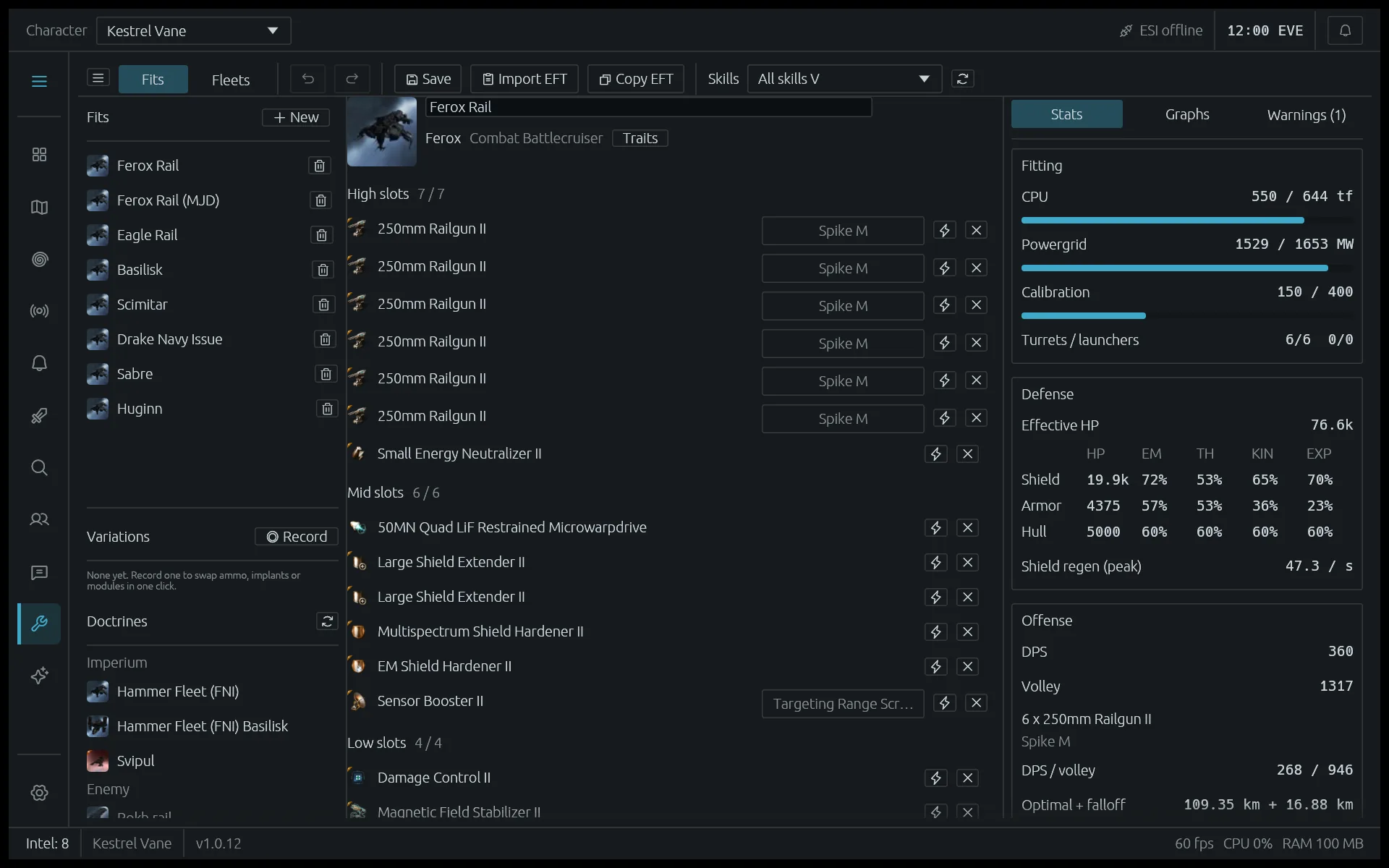
A fitting tool in the app and at eve-spai.com/sim: paste an EFT fit, see its tank, damage, capacitor, speed and application the way the game works them out, with your characters' real skills and the skills a fit still needs. Record variations for ammo, implants, boosters or a refit and switch them in one click, and put fits together into a fleet to compare it with the enemy's.

  • Doctrines: the Imperium's presets and the enemy's, kept up to date for coalition members.
  • Warnings: missing paste, no ammo for a damage type or a range, an unstable capacitor, unmet skills.
  • Graphs: damage against distance, speed and signature, capacitor and shield over time, remote repair and ewar reach.
  • Fleets: how many of each fit fly, command bursts on everyone, and against another fleet: applied damage, critical mass and the break point of their reps.
The fitting simulator with a rail Ferox open
08

Your EVE settings, from outside the game

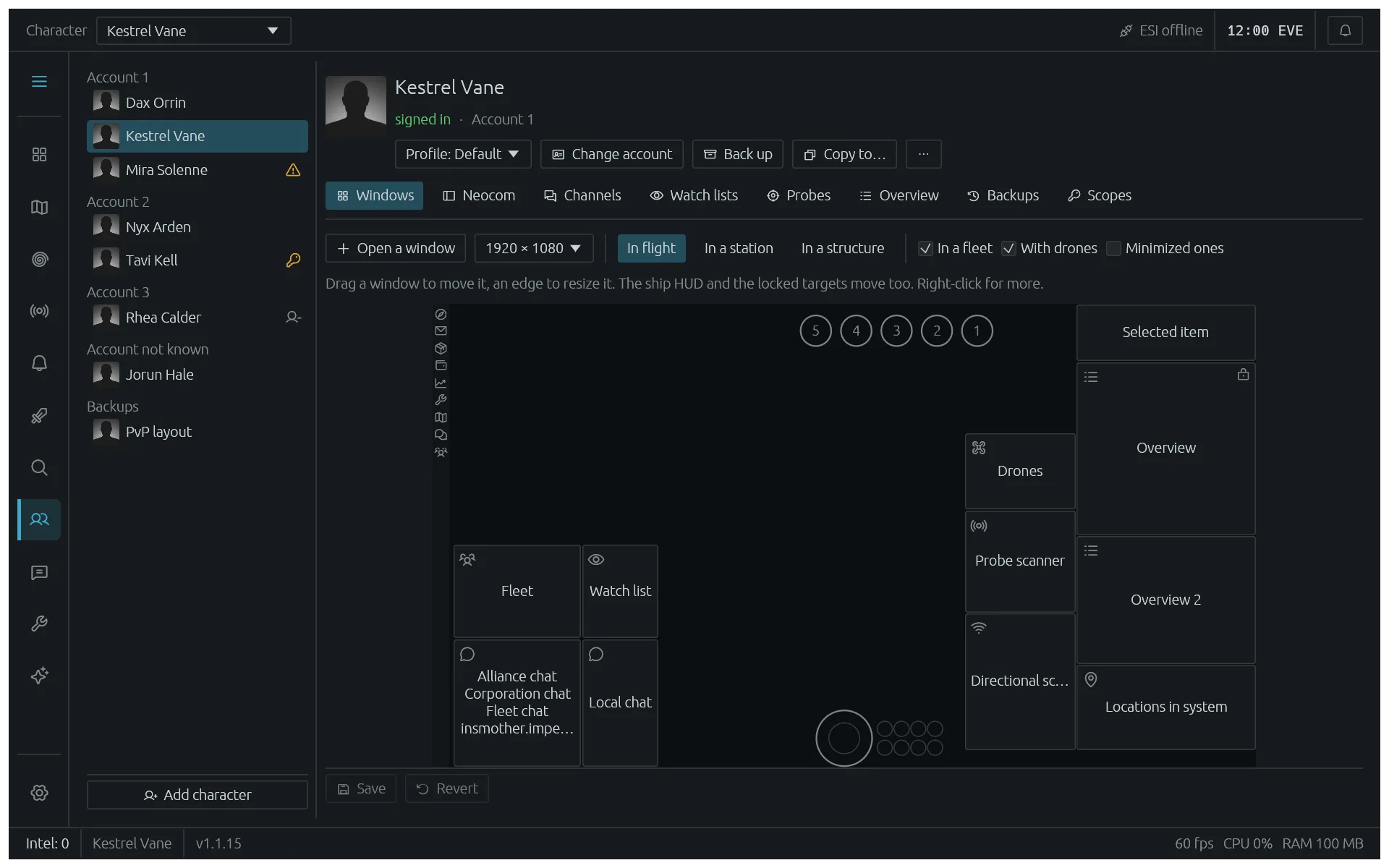
Set a character up without logging it in. EVE Spai reads the game's own settings files and shows what is in them: the window layout drawn to scale, the Neocom, chat channels, watch lists, the overview and probe formations. Change them here, and copy a finished setup onto your other characters, whole or part by part.

  • Window layout: drag and resize every window on a picture of your screen, in flight, in a station or in a structure, with the ship HUD and the locked targets.
  • Overview: a filter per tab for what it lists and one for its brackets, the item groups and pilot states each filter takes in, colour tags and backgrounds, columns and options.
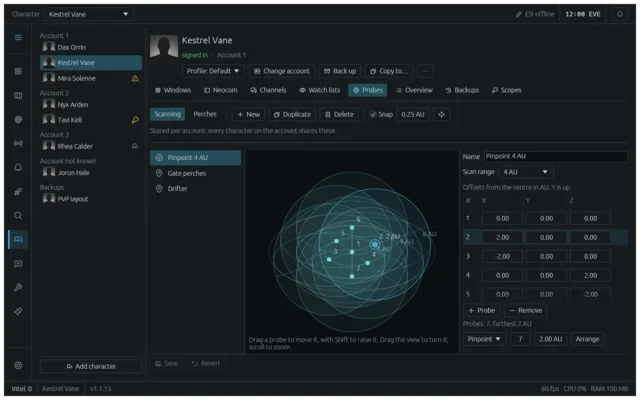
  • Probe formations: a 3D editor for scanning formations in AU and on-grid perches in km, with a Drifter preset.
  • Backups: every change keeps a copy of what was there. Name the ones worth keeping, look inside them and restore them onto any character.
  • Scopes: what each character has granted, what is missing and what each scope is for.

Saving needs the game closed: the client writes its files again when it exits.
The window layout of a character drawn to scale, with every window movable
A scan probe formation in a 3D view Overview filters in their pack colours
09

Jabber, made for the Imperium

Never miss a fleet: pings and chat right in the app. Pings are read into FC, formup, doctrine and comms, with a button to join Mumble.

  • Rooms and DMs: in the app or in their own windows.
  • Ping rules: pick which pings sound, pop up or reach your phone.
  • Over the game: a ping window shows new fleets while you play.
The Jabber view with the fleet ping feed The fleet ping window
10

AI assistant optional

Ask about the situation in plain words, typed or spoken: where a gang went, what is near you, the fastest safe route home. It reads the same intel, kills, maps and pings you see and answers in a few lines, with systems, ships and killmails linked.

  • Talk to it: push to talk while you play and hear the answer; speech can run on your own machine.
  • Your model: Claude, OpenAI, Gemini, a local model through Ollama or LM Studio, or your Claude or ChatGPT subscription.
  • You decide what it reads: tick what it may see; Jabber and intel only ever go to the model you picked.
  • Watches: ask it to keep an eye on a gang or a system and it speaks up when something matches.
  • Asks before it acts: map highlights, routes, Jabber messages and fleet actions wait for your yes.
The assistant answering where a pair of hostiles went, with linked systems, a killmail and a watch running

Notes and tags

Tag systems and pilots, write notes, share folders with your friends.

Phone web view

Intel, map and routes on your phone or a second screen, on your own network.

D-scan sharing

A d-scan on the clipboard becomes a link to share in one click.

Light on resources

One native window, no browser engine, a few hundred megabytes of memory.

In your language

English, Deutsch, Español, Français, Русский and 中文. Ship names stay in English, the way pilots call them, unless you want them translated too.

Map over the game

A see-through map laid over EVE, on top only while the game is.

Make it yours

Nearly everything can be set to how you fly. A few of the things you can change:

  • Alert rulesTop rule wins: match on severity, distance, count, hulls, channels, characters and tags; notify, pop up, push or stay quiet.
  • Ping rulesPer FC, doctrine, PAP type or keyword: a sound, a notification, a push, or nothing.
  • SoundsA sound and a volume for each kind of event, one master volume and mute.
  • ThemesCaldari, Amarr, Minmatar, Gallente and Daylight, or your own three colours.
  • Map layersSovereignty by alliance or coalition, activity, jump bridges, zones, gate kills, storms and more.
  • Jump bridges and zonesPaste your network, set the capital and the Ansiblex zone routes may use.
  • Intel channelsPick yours or start from a coalition pack; turn characters off one by one.
  • LanguageSix languages to start with, asked for when you set up and changed any time.
  • Wormhole routesWhich kinds of hole routes may use, and how much mass, time and size they need.
The alert rules editor
The settings view The map layers panel

Feedback

EVE Spai is under active development and shaped by the pilots who use it. Ideas, feedback and bug reports are welcome.